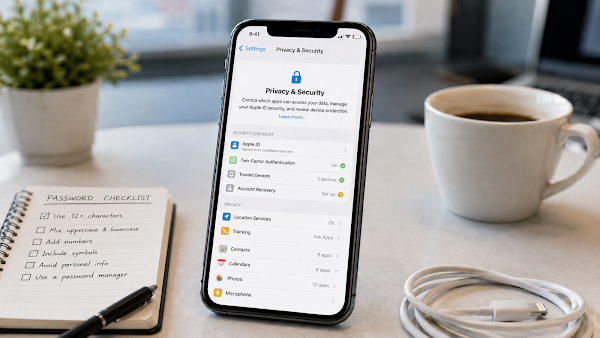
Your iPhone stores photos, messages, passwords, location data, financial apps, and personal accounts. That makes privacy and security settings important for every user.
Quick Summary
- Use two-factor authentication for Apple Account.
- Review trusted devices and account recovery options.
- Check app permissions for location, camera, microphone, and photos.
- Use a strong passcode.
- Watch for phishing messages and fake login alerts.
Security Settings to Review
- Open Settings and tap your name.
- Review Sign-in & Security.
- Confirm two-factor authentication is on.
- Check trusted phone numbers and devices.
- Review account recovery options.
- Check Privacy & Security permissions.
Privacy Checklist
| Setting | What to Review |
|---|---|
| Location Services | Which apps can access location. |
| Photos | Which apps can see all or selected photos. |
| Microphone | Which apps can use microphone access. |
| Camera | Which apps can use the camera. |
| Tracking | Which apps can request tracking permission. |
| Trusted Devices | Devices signed in to your Apple Account. |
Phishing Safety Tips
- Do not click suspicious account warning links.
- Go directly to Settings or the official website instead.
- Do not share verification codes.
- Be careful with messages saying your account will be locked.
- Use unique passwords for important accounts.
Helpful Security Step
Review Privacy & Security settings once a month, especially after installing new apps or signing in on a new device.
FAQ
Is two-factor authentication important?
Yes. It adds another layer of protection for your Apple Account.
Should every app have location access?
No. Give location access only to apps that truly need it.
What if I see an unknown trusted device?
Review your account immediately and remove devices you do not recognize.
Can scammers ask for verification codes?
Yes. Never share verification codes with anyone who contacts you unexpectedly.
Final Thoughts
iPhone privacy and security settings can help protect personal data, accounts, and family information. A simple monthly review can reduce risk and keep your device safer.
Sources: Apple Support Apple Account security, two-factor authentication, and Privacy & Security resources.